Dental CRM
How to Choose Dental CRM: 12 Features and an Implementation Checklist
A practical guide to dental CRM selection: patient records, dental charting, scheduling, treatment plans, finance, integrations and a controlled pilot.

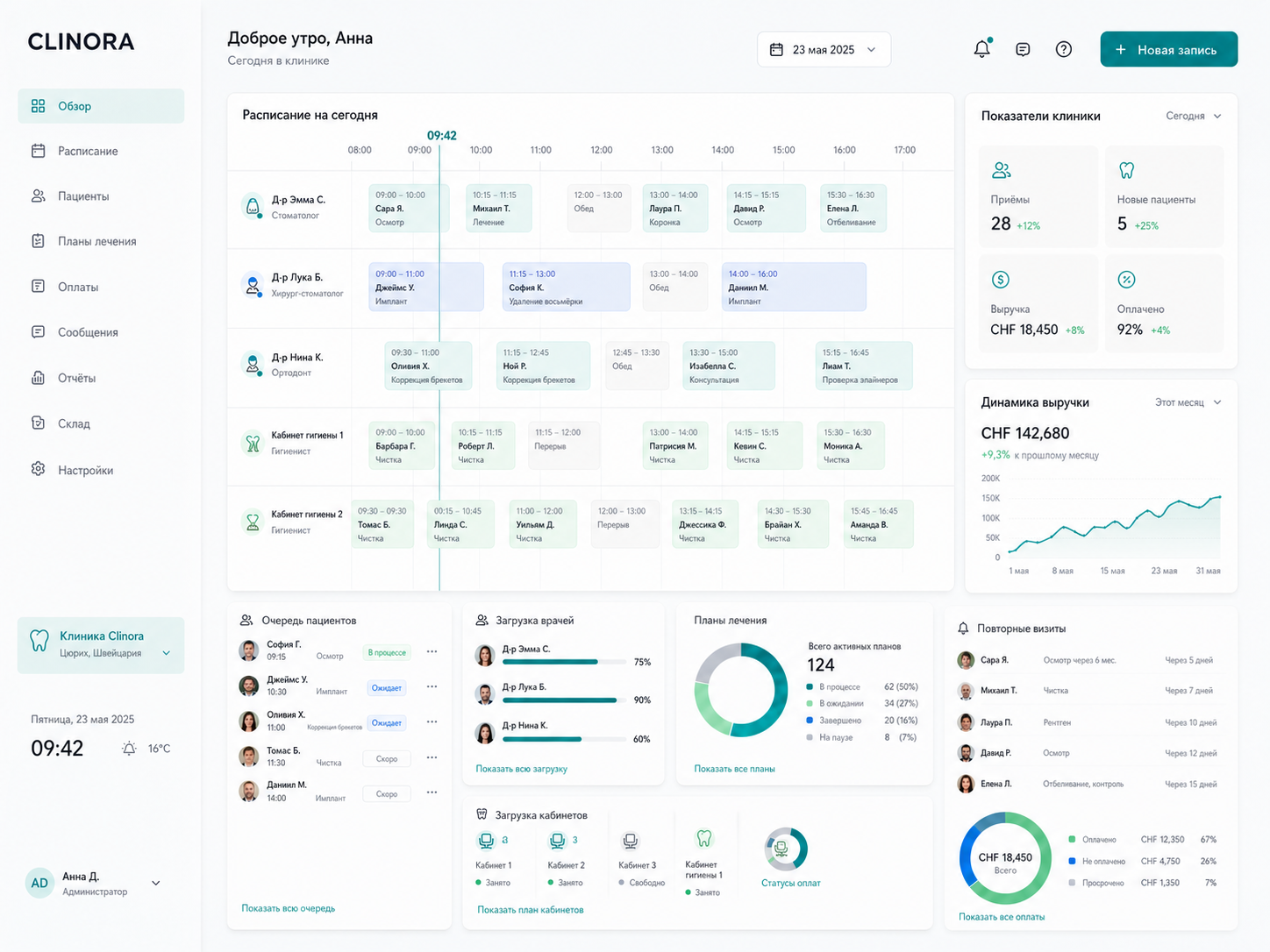
Dental CRM must connect more than leads and calls. It should support the patient journey from booking and treatment planning to payment and a follow-up visit. A generic CRM feature list is therefore not enough to compare systems for a clinic.
This guide explains 12 essential capabilities, the questions to ask during a product demonstration and a practical pilot sequence. It is designed for clinic owners, network managers and people responsible for automation.
How dental CRM differs from a general-purpose CRM
A general CRM organises leads, deals, tasks and sales communication. A dental clinic needs more: booking must account for the doctor, room and appointment duration, the patient record must preserve treatment history, and each payment must connect to a treatment plan and performed procedure.
Industry-specific CRM does not replace a clinician or make clinical decisions. It standardises administrative and financial operations, preserves a reliable action history and prevents the team from duplicating data across calendars, spreadsheets and chats.
- The patient is the centre of the system, not merely a sales contact.
- The schedule connects doctors, rooms and treatment plans.
- Finance and follow-up visits are generated from actual appointments.
- Access rules reflect administrator, clinician and manager roles.
12 features to verify before purchasing
A polished interface is easy to assess during a demo, but daily reliability is harder to validate. Ask the vendor to show one complete journey from a new patient enquiry to payment, the next appointment and a management report.
The list below is a practical minimum. Implementation details matter, so verify not only whether a feature exists but also how many manual steps it requires, how roles restrict access and whether the clinic can export its own data.
- Unified patient record and interaction history.
- Dental chart and tooth condition records.
- Treatment plan with stages, procedures and statuses.
- Doctor, room and equipment scheduling.
- Online booking with available-slot controls.
- Reminders, confirmations and follow-up visits.
- Payments, balances, refunds and transaction history.
- Materials inventory and stock thresholds.
- Dental laboratory work and due dates.
- Transparent inputs for clinician compensation.
- Reports for utilisation, cancellations, revenue and retention.
- Roles, audit trail, backups and full data export.
| Workflow | Minimum capability | Demo test |
|---|---|---|
| Patient | Record and unified history | Find visits, documents, payments and the next action without switching systems |
| Treatment | Dental chart and plan | Change a stage, preserve history and explain access permissions |
| Booking | Calendar and online booking | Move an appointment without conflicts across doctor, room or duration |
| Communication | Reminders and confirmations | Show consent, delivery status and the cancellation workflow |
| Finance | Payments and balances | Connect a payment to the patient, appointment and treatment plan |
| Resources | Inventory and laboratory | Check consumption, stock, ordering and laboratory due dates |
| Team | Roles and compensation | Compare clinician, administrator and manager access |
| Control | Reports, audit and export | Export data and identify the author of a change |
Patient record, dental chart and treatment plan
The patient record should connect contact details, consent, visit history, images and documents, clinical notes, treatment plans and financial operations. If important information opens only in a separate archive, clarify how records stay linked and who owns data quality.
A useful treatment plan shows more than a list of procedures. It needs sequence, stage, status, clinician, price and completion data. Change history should remain available so the team can understand why a plan was revised and avoid disputed manual edits.
- Fast patient search with duplicate prevention.
- Change history for plans and completed procedures.
- Documents and payments linked to treatment stages.
- A clear next action for both administrator and clinician.
Scheduling, online booking and reminders
A dental calendar must account for clinician availability, room, equipment, procedure duration and operational breaks. Moving an appointment should prevent conflicts and preserve history instead of simply relocating a coloured block.
Evaluate online booking and reminders as one workflow. Verify which slots patients can see, how visits are confirmed, what happens after a cancellation and whether an administrator can offer released time to another patient without manually calling the entire database.
- Appointment types with different durations.
- Confirmation, cancellation and no-show statuses.
- Waitlist and follow-up booking after a visit.
- Message templates with delivery and consent controls.
Finance, inventory and compensation without manual reconciliation
The finance module should answer direct management questions: how much was charged and paid, where balances remain, which refunds were processed and how a transaction relates to treatment. A summary number without drill-down to the original operation is not enough for regular control.
Inventory and compensation require approved rules before automation. The system can calculate the basis for consumption and compensation, but the clinic owner must define service categories, materials, clinician percentages and exceptions first.
- Separate charges, payments, balances and refunds.
- Material consumption based on approved rules.
- Minimum stock thresholds and procurement notifications.
- Transparent compensation calculations with operation-level detail.
WhatsApp, website, telephony, Kaspi and 1C
An integration is useful when it removes duplicate input and assigns data ownership. A website enquiry should create or find a patient without duplicates, a call should preserve context, a payment should receive a stable identifier and the accounting system should accept only approved documents and statuses.
Before buying CRM, request a list of supported integrations, API limitations and the ongoing support model. If a connection depends on manual imports, a browser extension or unofficial access, record that approach explicitly as a technical risk.
| Integration | What it automates | Key question |
|---|---|---|
| Website and forms | Enquiry capture and online booking | How are duplicate patients prevented? |
| WhatsApp and SMS | Confirmations, reminders and service messages | Where are consent and delivery statuses stored? |
| Telephony | Caller record and communication history | How is an existing patient identified? |
| Kaspi and payments | Payment capture and reconciliation | Is there a stable link between payment and charge? |
| 1C | Accounting exchange and documents | Which system owns each data type? |
Roles, audit trail, backups and data export
Role-based access should restrict both screens and actions: viewing, editing, deleting, exporting and financial operations. Verify former-employee access removal, multi-factor authentication and the audit trail for sensitive changes.
Clarify where data is hosted, how backups are created and tested, how long history is retained and how the clinic can obtain a complete export. Legal requirements for data processing and hosting should be reviewed with a qualified specialist before launch.
- Roles for clinician, administrator, cashier and manager.
- Audit of sign-ins, changes, deletions and exports.
- Regular backups with tested recovery procedures.
- Usable export of patients, appointments, finance and documents.
Cloud or on-premise dental CRM
Cloud software is usually faster to launch, updates centrally and simplifies multi-location access. On-premise deployment provides greater infrastructure control but requires administration, monitoring, backups and a clearly accountable recovery owner.
Choose based on availability, responsibility and total ownership cost rather than marketing labels. Document who updates the system, resolves incidents, tests backups and keeps the clinic operational during internet or server failures.
| Criterion | Cloud | On-premise |
|---|---|---|
| Launch | Usually requires less infrastructure preparation | Requires server, configuration and an administrator |
| Updates | Centralised by the provider | Planned and installed by the owner’s team |
| Locations | Simpler for distributed teams | Requires secure network access |
| Responsibility | Shared with the provider by contract | Largely remains with the clinic |
How to implement CRM without stopping clinic operations
A controlled implementation starts with one complete workflow and baseline metrics, not with migrating every historical record. A pilot can cover one location, a limited team and the core modules: scheduling, patient records, treatment plans, payments and reminders.
After launch, measure adoption rather than screen count: appointments without manual duplicates, required-field completion, booking speed, no-show rate and reporting time. Expand to additional locations and complex integrations only after the pilot workflow is stable.
- Assign an implementation owner inside the clinic.
- Map the current workflow and record baseline metrics.
- Agree on required fields, roles and first-release boundaries.
- Clean the data and run a small test migration.
- Pilot with one team and train users by role.
- Collect errors, measure impact and then scale the system.
Dental CRM selection checklist
Before making a final decision, run a working demonstration using your clinic’s own scenario. Answers should be supported by actions inside the product, documentation or contract terms rather than a promise to add the feature after purchase.
If several essential questions remain unresolved, begin with a limited-data pilot. It is safer and less expensive than moving the entire clinic into software that cannot support the core workflow.
- Can the team complete the patient journey from booking to follow-up in one system?
- Does the calendar support clinicians, rooms and variable procedure duration?
- Are dental charting, change history and treatment planning available?
- Are charges and payments linked to appointments and treatment plans?
- How are balances, refunds and corrections recorded?
- Are inventory, laboratory work and due dates supported?
- Can each clinician compensation calculation be explained?
- How does the system prevent duplicate patients and appointments?
- Which integrations are officially supported and maintained?
- How do roles, audit trail and access removal work?
- How are backups created and recovery tested?
- Can the clinic obtain a complete export in a usable format?
Frequently asked questions about choosing dental CRM
CRM selection depends on clinic size, number of locations, existing data and integration depth. Compare total ownership cost and the ability to support one complete workflow rather than subscription prices alone.
The answers below will help prepare vendor questions and define a sensible pilot before a long-term agreement is signed.
Can a dental clinic use a general-purpose CRM?
It can support leads and communication, but dental scheduling, charting, treatment plans, payments and clinical history usually require industry modules or substantial customisation.
What should a dental CRM pilot include?
One location or team, scheduling, patient records, treatment plans, payments, reminders and several management reports. This is enough to validate daily operations and data quality.
Can data be migrated from spreadsheets or an old system?
Yes, when the source provides structured exports. Map fields, remove duplicates, run a test import and verify a sample with the clinic’s responsible employee before the full migration.
How long does implementation take?
The timeline depends on locations, source-data quality, modules and integrations. A reliable estimate follows workflow discovery and a clearly defined pilot scope.
What determines the cost of dental CRM?
Users and locations, data migration, integrations, custom roles and reports, infrastructure requirements and post-launch support all affect the total cost.