
Spark Studio case study
How We Built Napolika.ru: Flooring Catalogue and SEO Foundation
How Spark Studio built Napolika: catalogue architecture, product pages, measurement and installation journeys, technical SEO and a foundation for organic growth.

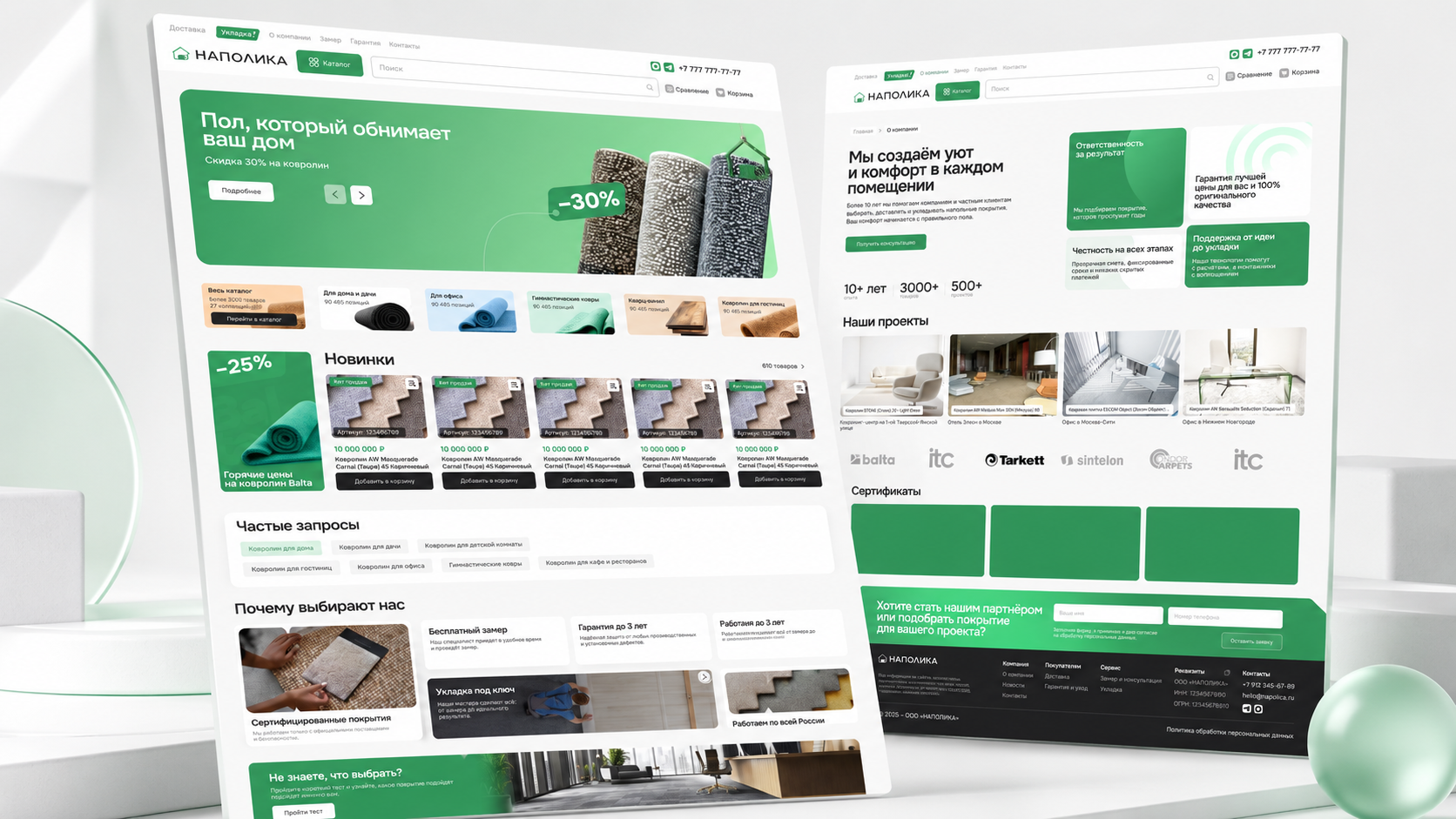
Napolika.ru is a flooring e-commerce website where customers choose not only a material but also the surrounding service: consultation, free measurement, installation and warranty. The task therefore went beyond a visual storefront and required a clear journey from product discovery to an enquiry or order.
This case describes the implemented product and technical foundation. We do not claim unverified rankings or traffic growth: search outcomes must be evaluated after sufficient Search Console and lead-analytics data is available.
The task: connect products and services in one journey
Flooring customers compare material, colour, specifications and price, but the final decision also depends on measurement, room preparation, installation and warranty. Splitting these elements across disconnected pages makes the decision harder.
We defined the core Napolika journey as finding the right category, exploring a product, comparing options and requesting consultation, measurement, a commercial proposal or an order without losing context.
- Present the assortment through categories and subcategories.
- Make product properties and pricing clear.
- Connect products to measurement, installation and warranty.
- Provide a manageable content and SEO foundation.
Catalogue architecture and the buying journey
The product includes a catalogue, categories, subcategories, product pages, search, comparison and cart. Dedicated routes cover measurement, installation, warranty and care, projects, news and contact information.
This architecture separates intent. An informational visitor can research a material or maintenance, while a commercial visitor can move directly to a category, product or service enquiry.
| Group | Customer task | Next action |
|---|---|---|
| Categories | Choose a flooring type | Open a product selection |
| Product pages | Compare properties, options and price | Add, compare or request a quote |
| Measurement and installation | Understand service terms | Submit an enquiry |
| Projects and news | Review experience and guidance | Open a product or consultation |
Product pages, search and commercial forms
Product pages include images, price, availability, characteristics, related products and dedicated information tabs. The catalogue supports filters, selected values, grid and list views, while search covers name, SKU and description.
Commercial actions are not reduced to one generic form. A visitor can request a proposal for a specific item, ask a product question, place a quick order or add measurement and installation to the purchase journey.
- Categories, subcategories and filterable attributes.
- Search with query variants and clear empty states.
- Product comparison and related items.
- Forms that retain product or service context.
The technical SEO foundation
Napolika is built with Next.js, allowing important pages to deliver meaningful HTML and server metadata. Pages, categories, products and news items support their own title, description, canonical and Open Graph data.
The website creates a sitemap from catalogue data and uses breadcrumbs plus Product, Offer, Article, ContactPage and FAQ structured data. Search and utility pages receive indexing controls where they should not compete with primary landing URLs.
- Canonical URLs for products, categories and content.
- A dynamic sitemap for the growing catalogue.
- Product and Offer schema for commerce pages.
- BreadcrumbList, Article, FAQ and contact data.
- Indexing controls for utility and search URLs.
Content and internal links around commercial demand
Product pages alone cannot address the entire search journey. Categories support product selection, service pages explain measurement and installation, while projects and news provide examples, guidance and trust.
The next growth stage builds on these relationships: editorial content links to relevant categories and products, product pages explain available services, and service pages return customers to suitable products and enquiry paths.
- Avoid duplicate categories created only for similar keywords.
- Link articles to products and services through real context.
- Develop category pages with guidance, attributes and FAQs.
- Publish installation cases with materials and project conditions.
Quality checks before launch
The project includes automated checks for metadata, canonical URLs, product schema, breadcrumbs, catalogue behavior, forms, card accessibility and mobile image stability. They protect core journeys as the product evolves.
Measurement, warranty, product-question and commercial-proposal forms are tested alongside cart states, ordering, mobile filters and dynamic data behavior. An indexed page is only useful when its next customer action works reliably.
- Metadata and canonical rules for dynamic page types.
- Structured data and correct product URLs.
- Mobile catalogue and image stability.
- Context-aware forms and error states.
- Accessible cards, navigation and breadcrumbs.
The result and the next SEO stage
Napolika now has a manageable e-commerce system where the catalogue, product pages, services, projects and forms operate as one buying journey. The technical model can grow with the assortment and content without rebuilding every page manually.
SEO continues with real post-launch data: validate index coverage, queries and CTR in Search Console, configure key GA4 events, identify categories earning impressions and systematically strengthen pages capable of generating qualified enquiries.
- Validate sitemap coverage and priority URL indexing.
- Connect organic enquiries to categories and products.
- Improve categories with impressions but weak CTR or rankings.
- Expand expert guidance and real installation projects.
- Earn relevant mentions from brands and partners.
Questions about e-commerce development and SEO
Store architecture depends on assortment, attributes, purchase methods and company operations. Catalogue and SEO templates should therefore be designed with the product model rather than attached after launch.
These short answers cover decisions commonly discussed when building a store with many categories and related services.
Why should product content be available without client-side JavaScript?
Server HTML improves the first content delivery and gives search engines a dependable source for product name, description, price and core attributes.
Does every filter need an indexable SEO page?
No. Only combinations with verified demand, stable inventory and unique value should be indexable. Other filters may create duplicates and waste crawl resources.
What matters more: category or product pages?
They address different searches. Categories help customers choose a solution type, while product pages capture demand for a specific item, collection or SKU.
Can technical optimization guarantee ranking growth?
No. It removes barriers, while rankings also depend on demand, assortment, content, competitors, domain history and external authority signals.
What data is needed after launch?
At minimum, use Search Console, GA4 key events and an enquiry source in CRM. This connects impressions and clicks to actual leads.